

Site Audit
Check a site's security before you launch it.
For Mac with Apple silicon, macOS 26 or later. No account. Your reports never leave your Mac.
By buying you accept the terms of sale.
Question before you buy? Ask here. Already using Site Audit? Get support.
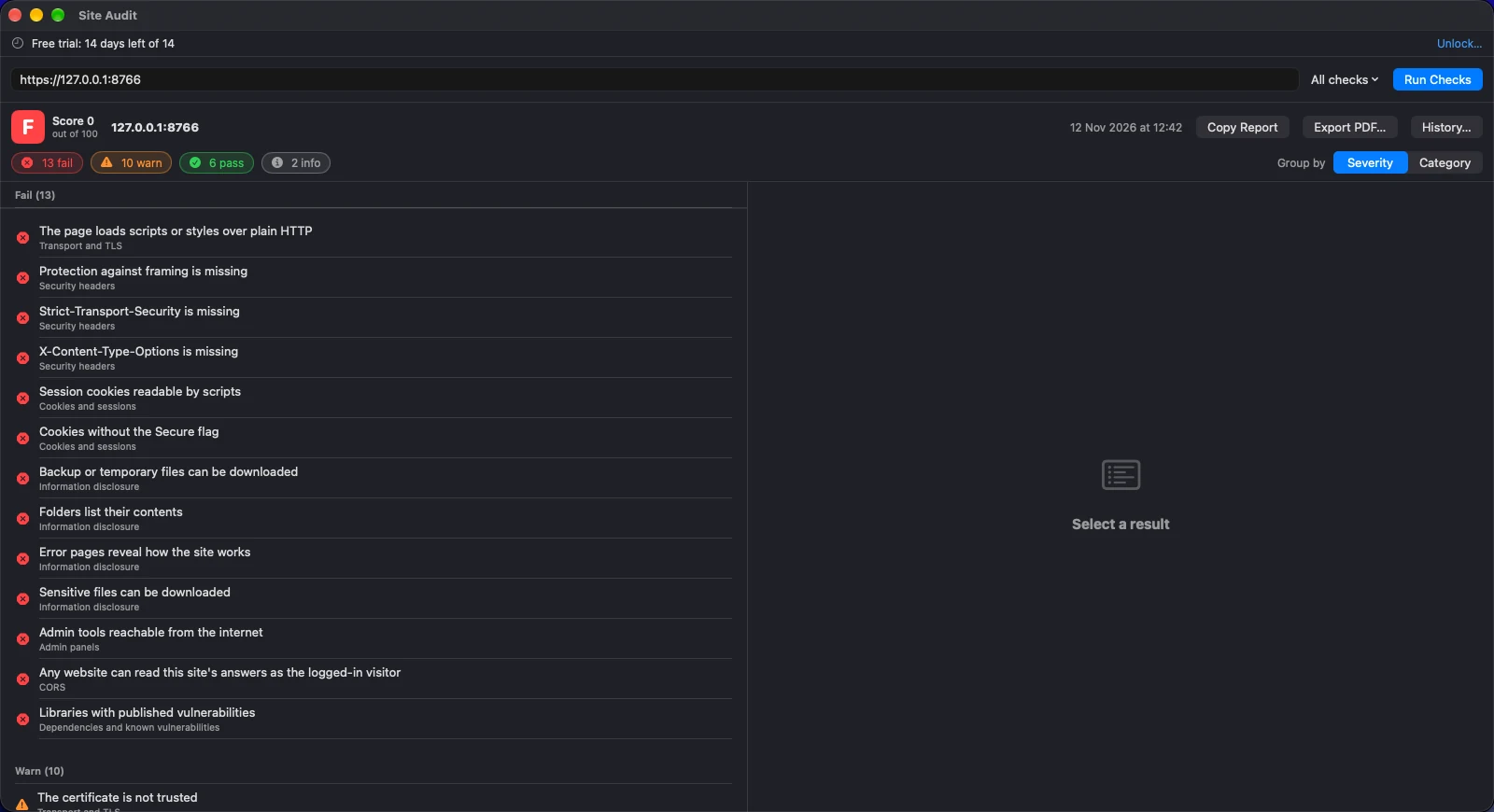
A made-up test shop with the usual launch-day mistakes. Site Audit grades it F and tells you how to fix each one.
The pre-launch check, in one window.
Site Audit is a native Mac app for anyone who ships websites. Enter an address, run the checks and get a graded report that says what is wrong and how to fix it. It does not try to break in: every check is an ordinary request, the kind any browser sends.
Passive and safe
It never logs in, never submits a form and never tries a password. It reads what the site already sends to every visitor.
A fix for every problem
Each result says what was seen, why it matters and exactly what to change, such as the header and value to add.
A report for the client
Export a PDF with the grade, the findings and the fixes. Scan again after the fixes and see what changed.
Pay once
One payment unlocks the app. No subscription, no fee per scan and no account.
What it looks like.
Real screens from the app. The first is a made-up test shop; the second is our own site.
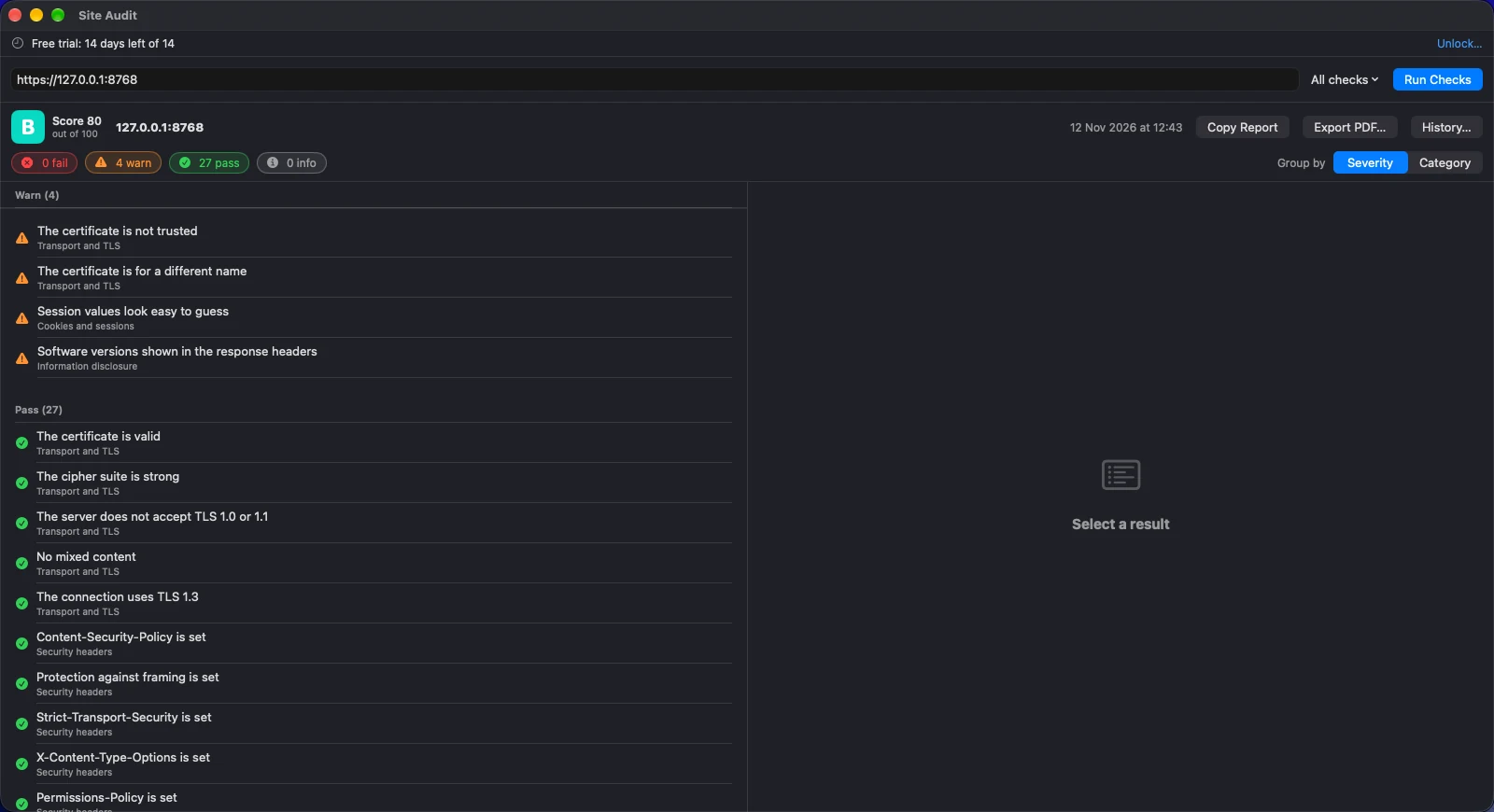
The same shop after the fixes
No failures left and a B. What remains is a short list of warnings, each with its own explanation and fix. Run it again after every change and the grade follows.
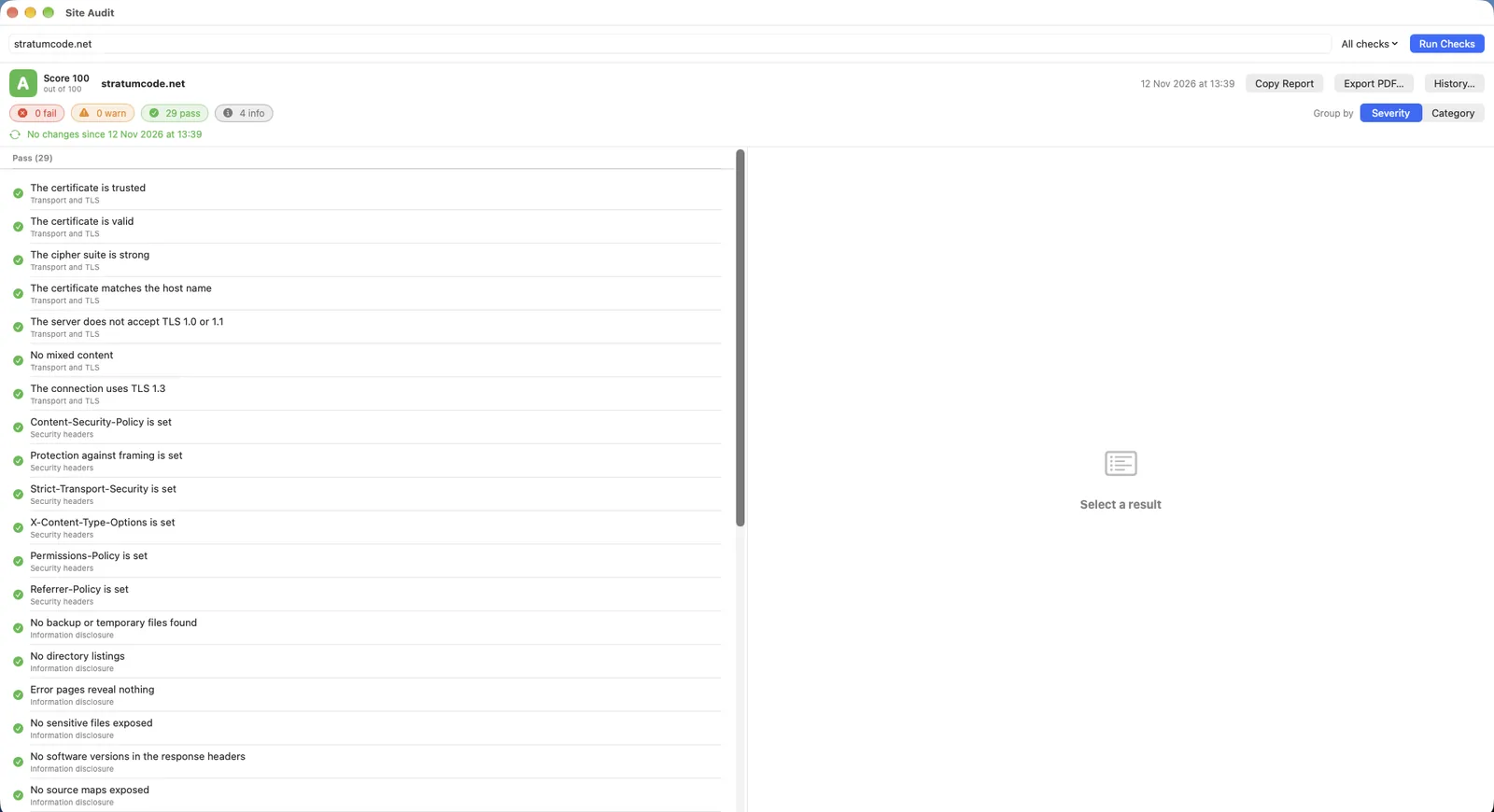
A clean sheet: our own site
This is stratumcode.net, checked with Site Audit: no failures, no warnings, 29 passes and a score of 100. An A means no common mistake was seen. It does not mean the site cannot be broken.
Nine groups of checks.
Nothing here is a promise. Every check below is built and in the app today.
Transport and TLS
Is the connection to the site private, and is the certificate sound?
HTTPS in use
Fails a public site that answers over plain HTTP.
Certificate checked
Valid dates, a trusted issuer, and a name that matches the site. A certificate close to expiry is flagged by the days left.
Protocol and cipher
Reports the TLS version in use, tests that TLS 1.0 and 1.1 are refused, and grades the cipher suite.
Mixed content
Finds scripts, styles and images that a secure page still loads over plain HTTP.
Local sites handled fairly
A self-signed certificate on localhost is a warning, not a failure, because that is how development works.
Security headers
The headers that tell a browser how to protect your visitors.
Content-Security-Policy
Present, and not undone by unsafe-inline or unsafe-eval.
Framing protection
X-Frame-Options or frame-ancestors, so another site cannot put yours in a frame.
Strict-Transport-Security
Present, with a long enough lifetime.
The rest
X-Content-Type-Options, Referrer-Policy and Permissions-Policy.
Exact fixes
Every missing header comes with the value to add.
Cookies and sessions
Session cookies are what an attacker wants most.
Secure and HttpOnly
Flags missing on cookies. A session cookie that scripts can read is a failure.
SameSite
Missing or set to None without Secure.
Predictable values
Session cookies that look too short or too simple to be random.
Cookie scope
Session cookies shared with every subdomain.
Information disclosure
Things the site tells the world that it should keep to itself.
Exposed files
Looks for .env, .git, configuration files and similar, and judges the content, so a site that answers every address with its home page raises no false alarm. Reports the path and never repeats what is inside.
Backups and listings
Backup and temporary files, and folders that list their contents.
Error pages
A stack trace or file path in an error page.
Source maps
Source maps that hand over your original code.
Version numbers
Server and framework versions in response headers.
robots.txt and sitemap
Paths that name something that should be secret.
Admin panels
Tools and logins that should not face the internet.
Database and server tools
phpMyAdmin, Adminer, Tomcat Manager, Spring Actuator, phpinfo, server-status and more. Found by what the page says, not by its address alone. Never logged in to.
Admin logins
Login pages at the usual addresses, reachable from anywhere.
Default pages
A web server's or framework's stock welcome page still live.
Cross-origin access
Can another website read your site's answers as your visitor?
Reflected origins
A site that copies any origin into its permission header, and especially with credentials.
Wildcard with credentials
The combination browsers refuse and developers work around badly.
Libraries with known flaws
Old code on the page is the commonest way in.
Versions read from the page
jQuery, Bootstrap, AngularJS, Lodash, Vue, Moment and others, read from the file name, the address or the banner at the top of the script.
Looked up in OSV.dev
The open vulnerability database. Only the library name and version are sent, never your site's address.
DNS and mail
For sites you do not run on your own Mac.
SPF, DKIM and DMARC
Whether forged mail that claims to come from your domain would be delivered.
CAA
Whether the domain limits which authorities may issue its certificates.
Zone transfer
Whether your nameservers hand the whole list of your hosts to anyone who asks. Only the nameserver is reported, never the zone.
Database exposure
Also for sites you do not run on your own Mac.
Open database ports
MySQL, PostgreSQL, SQL Server, MongoDB, Redis, Elasticsearch, Memcached, CouchDB and Oracle. Site Audit connects and hangs up. It sends nothing.
It reads. It never breaks in.
Site Audit is the first-pass check, not a penetration test. For exploit-grade testing, use a tool built for it and written permission to match. This one is meant to be safe to point at your own sites every day.
- Only ordinary requests: no logins, no form submissions, no exploits
- A site that is not on your Mac needs your confirmation before each session
- Never sends a request to any host you did not enter, except DNS lookups, the domain's own nameservers and the OSV.dev library lookup
- Reports and history stay on your Mac. Nothing is uploaded or tracked
Site Audit report for example.com
Grade C  ·  Score 70 of 100

Fail  Strict-Transport-Security is missing
Warn  Software versions shown in the response headers
Warn  DMARC only monitors
Pass  The certificate is trusted
Pass  No sensitive files exposed

# Each result: what was seen, why it matters,
# and the exact change to make.
$29.99. Pay once. Yours to keep.
Try Site Audit free for 14 days with every feature on. If it earns a place in your launch routine, one payment unlocks it for good.
- 1. TryDownload Site Audit and use it for 14 days. No card, no account.
- 2. UnlockPay once and open the licence file we email you.
- 3. KeepNo renewals and no tiers. Every check is in every copy.
The price is shown at checkout.
Good to know.
Can I check any website?
Only sites you own, or have the owner's written permission to test. Site Audit asks you to confirm this before it checks any address that is not on your own Mac. Testing a site without permission can be a crime where you live or where the site is.
Is this a penetration test?
No. It is a first-pass check for common misconfiguration: missing headers, careless cookies, exposed files and the like. A good grade means no common mistake was seen. It does not prove that a site is secure.
What does it send, and where?
Ordinary requests to the address you entered. For a domain name it also looks up DNS records and asks the domain's own nameservers whether they hand out the whole zone, and it tries the usual database ports without sending anything. Library names and versions found on the page are checked against OSV.dev; the address of your site is not sent. Nothing about you or your reports is sent anywhere.
What happens when the 14 days end?
Site Audit becomes read-only. You can still open and read your saved reports, but running new checks and exporting reports needs a licence. Nothing is deleted. Open your licence file and everything works as before.
Do I need an account or an internet connection?
No account. To check a site on your own Mac, no internet connection is needed. The trial and your licence are checked on your Mac. About once a week, when you are online, a small public list of withdrawn licences is fetched. Nothing about you is sent.
macOS says it cannot verify Site Audit. What do I do?
Site Audit is not yet notarised by Apple, so macOS asks you to confirm it the first time you open it. Open System Settings, choose Privacy & Security, scroll to the message about Site Audit and click Open Anyway. You only do this once. The disk image also contains a READ ME FIRST file with the same steps, and an alternative Terminal command.
Can it check pages behind a login?
Not yet. It checks the address you enter and the well-known paths on the same site, the way a visitor would see them.
Can I show a client what I fixed?
Yes. Every finished scan is saved on your Mac, and a later scan of the same site shows what was fixed, what is new and how the grade changed. Export the report as a PDF to hand over.
What do I need to run it?
A Mac with Apple silicon, running macOS 26 or later. There is no Intel version.
Is there a Windows or iPhone version?
Not at the moment. Site Audit is a Mac app.