

Ductus
Flowcharts on your Mac, pay once.
For Mac with Apple silicon, macOS 26 or later. No account. Your files never leave your Mac.
By buying you accept the terms of sale.
Question before you buy? Ask here. Already using Ductus? Get support.
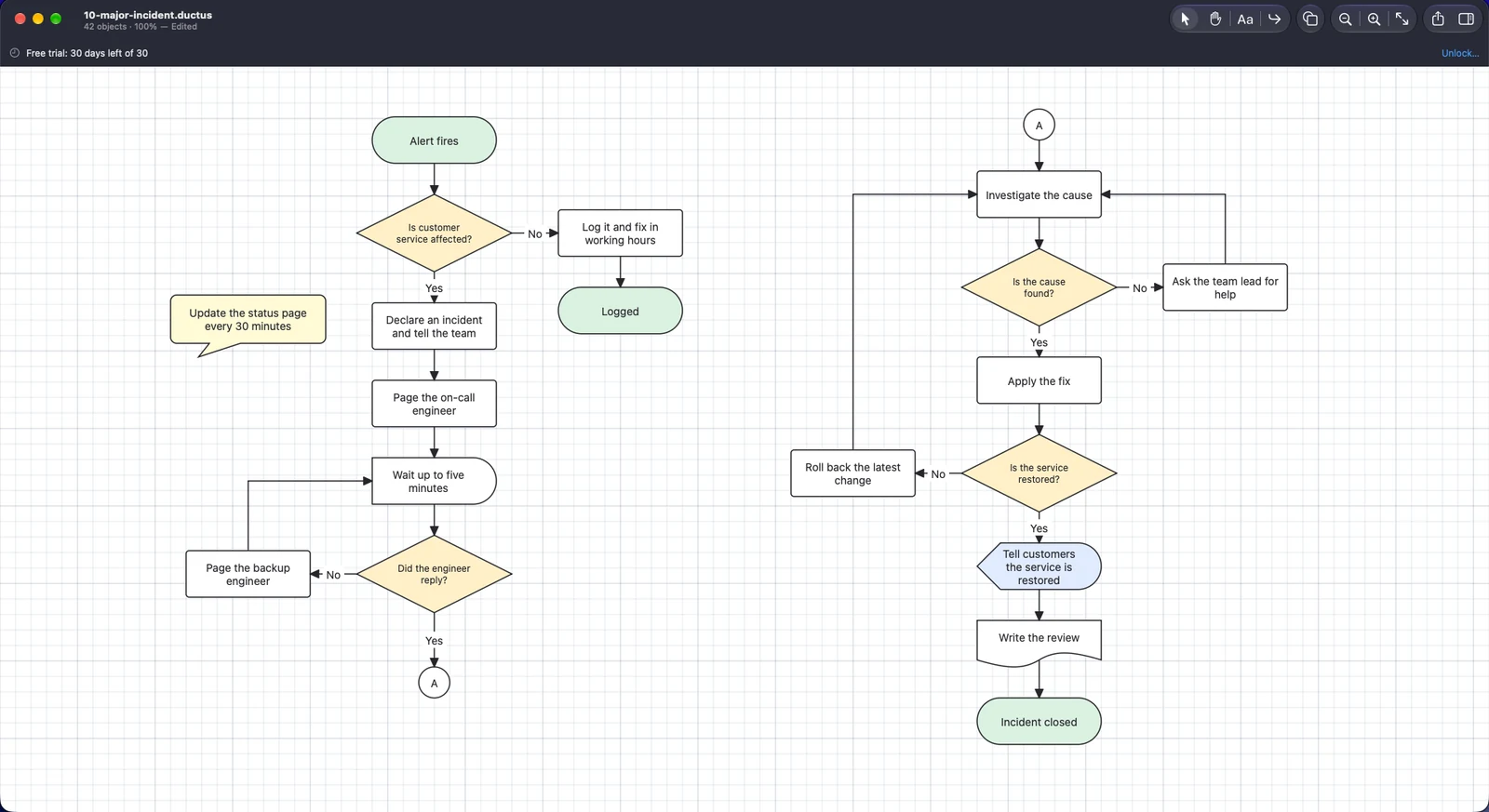
Shapes, lines and labels on one page. The lines route themselves.
Diagrams that tidy themselves.
Ductus is a native Mac app for flowcharts, process maps and simple diagrams. You place the shapes; it routes the lines, keeps them attached and keeps them out of the way. It does not ask for a subscription or a sign-in.
Pay once
One payment unlocks the app. No monthly fee and no feature held back behind a plan.
Lines that follow
Connectors stay attached to their shapes and re-route around other shapes when you move anything, in a single undo step.
Local first
Your diagrams are files on your Mac. It works offline, with no account, and nothing is uploaded.
What it looks like.
Real screens from the app, shown with a sample diagram.
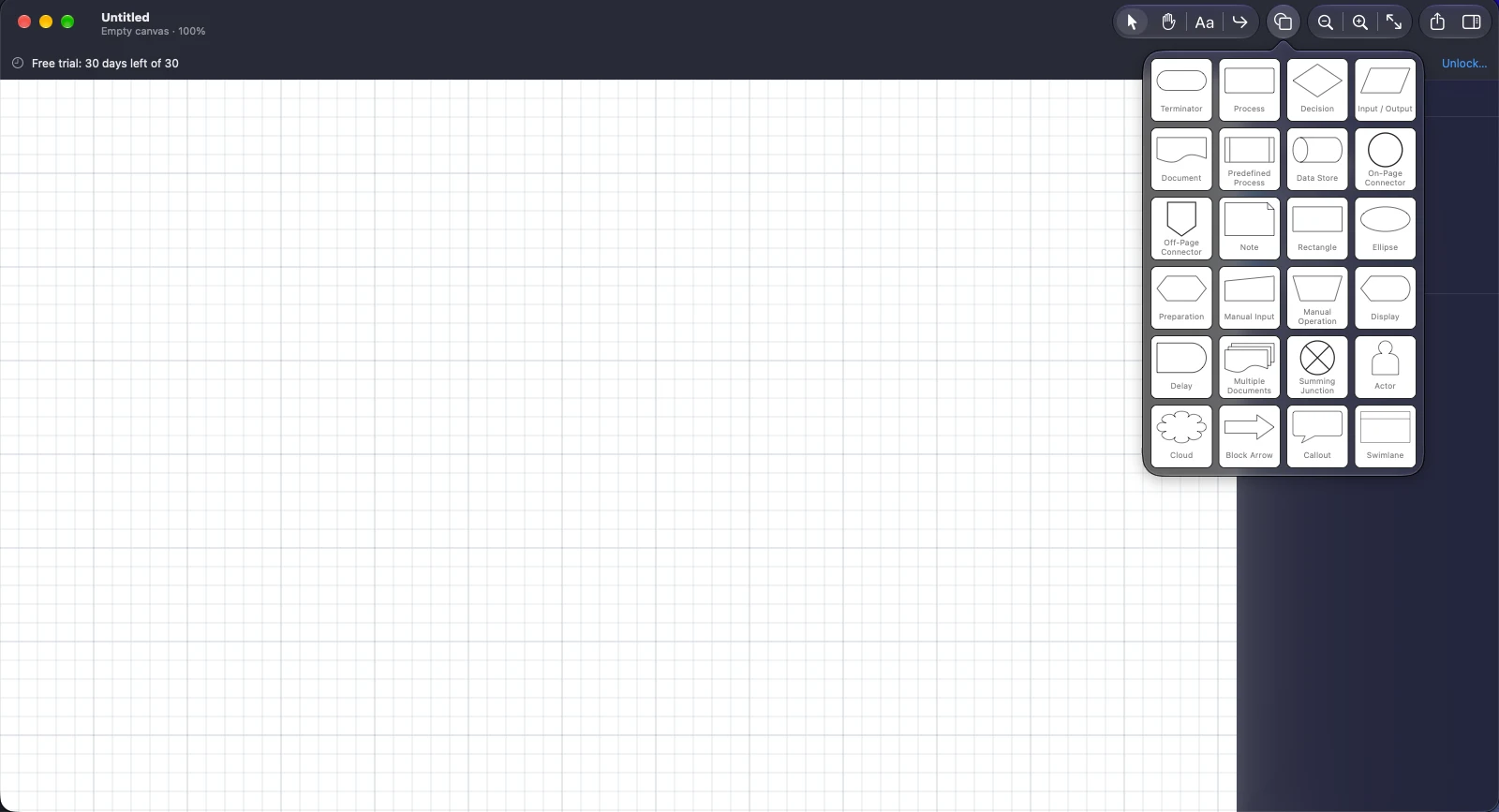
24 shapes in one library
Click, double-click or drag a shape from the library onto the page.
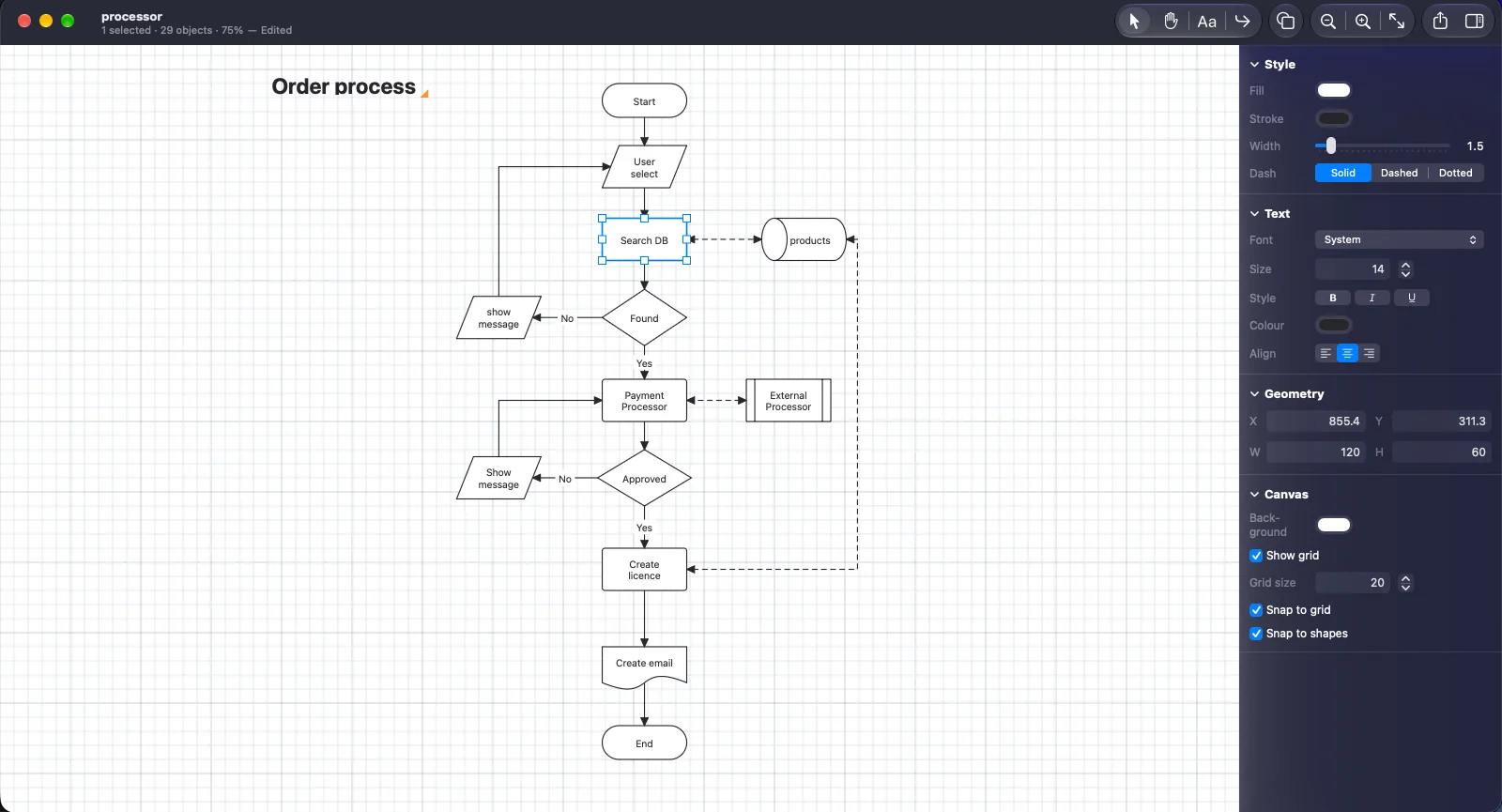
Every setting in one place
Style, text, exact position and size, and the canvas grid, for whatever you have selected.
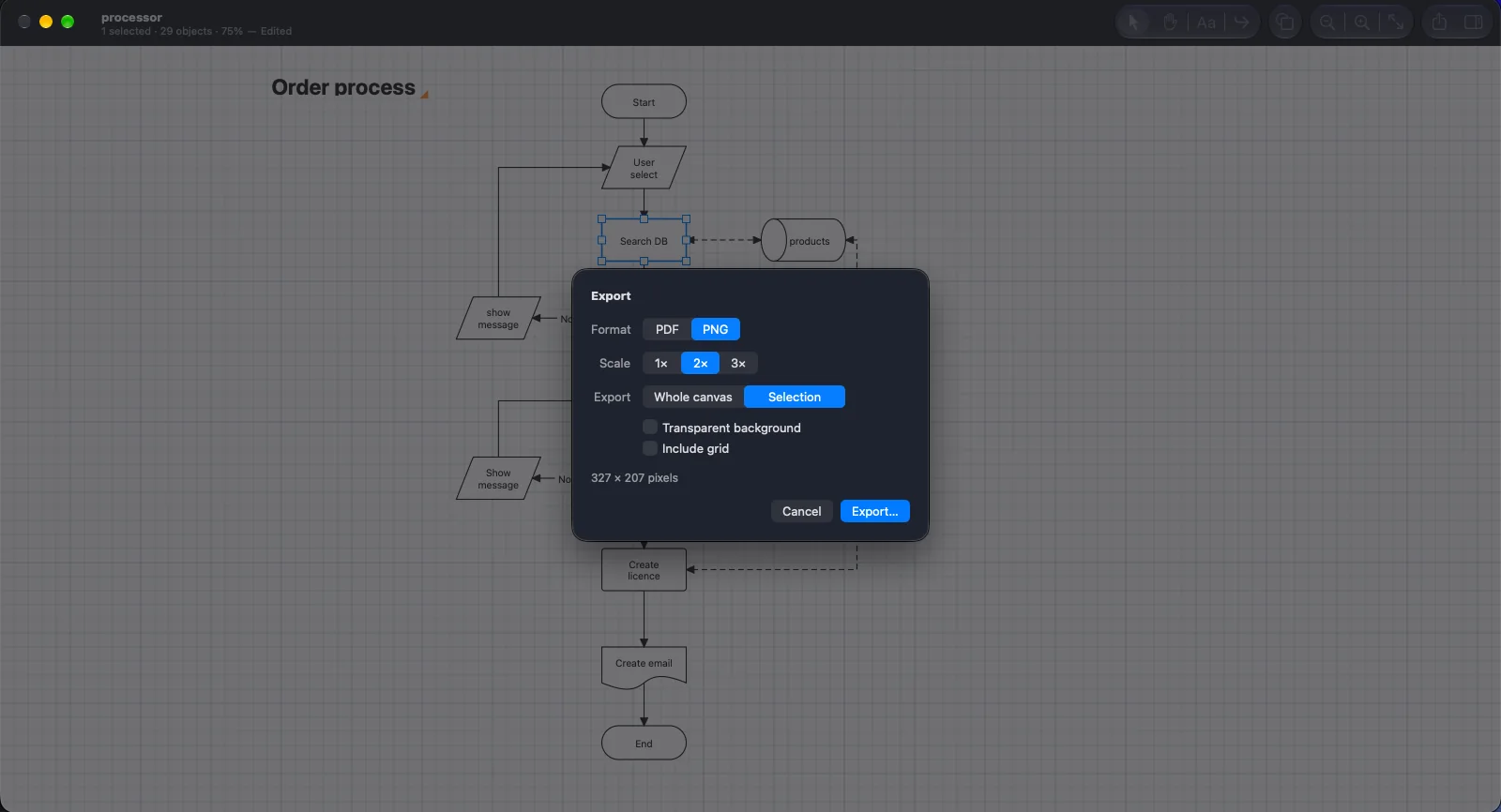
Export to PDF or PNG
Choose the format and the scale, the whole page or just your selection, with a transparent background if you want one.
The whole feature list, in one app.
Nothing here is a promise. Every feature below is built and in the app today.
Shapes and text
24 shapes, from the standard flowchart symbols to actors, clouds and swimlanes, with text that you edit in place.
24 shapes
The standard flowchart symbols (terminator, process, decision, input and output, document, data store, connectors and more), plus preparation, manual input and operation, display, delay, multiple documents, summing junction, actor, cloud, block arrow, callout and swimlane.
Type straight into a shape
Double-click a shape and type. Choose font, size, bold, italic, underline, colour and alignment.
Shape library
Open the shapes popover and click, double-click or drag a shape onto the page.
Fill, outline and dash
Set fill colour, outline colour, line width and dash style for any shape.
Exact position and size
Type the position and size of a shape in the inspector when a drag is not precise enough.
Sharp at any zoom
Zoom from 10% to 800%. Shapes and text are drawn as vectors, so they stay crisp.
Connectors
The part of a flowchart that usually takes the time.
Straight or right-angled
Draw a straight line, or a right-angled one that finds its own way around the shapes between its ends.
Stay attached
A line is fastened to a shape's side, so moving or resizing the shape moves the line with it.
Quick-add handles
Drag from the arrow beside a selected shape to draw a connector to the next one.
Arrowheads
Open, filled triangle, diamond or circle, chosen separately for each end.
Labels on lines
Put Yes and No on the branches of a decision, and set where the label sits along the line.
Loops
Connect a shape back to itself for a retry or a repeat.
Layout and editing
Get a tidy page without measuring anything.
Grid and alignment guides
Shapes snap to the grid and to the edges and centres of their neighbours. Hold Command to move freely.
Select and arrange
Click, shift-click or drag a rectangle around shapes. Nudge with the arrow keys, and bring forward or send back.
Copy, paste and duplicate
Copy a selection and paste it into the same diagram or another one. Lines to shapes you did not copy are left loose.
Undo and redo for everything
Every change can be undone, one step at a time, including a move that re-routes several lines.
Canvas settings
Choose the background colour, the grid size and whether the grid shows. These are saved in the diagram.
Windows, tabs and full screen
A normal Mac document app, with autosave, versions and your files in the Finder.
Export and print
Get the diagram into the document, the slide or the email.
Vector output sized to the diagram, with real text that you can search and select in Preview.
PNG
At 1×, 2× or 3×, with a transparent background if you want one.
Whole diagram or selection
Export the whole canvas, or only the shapes you have selected.
Copy as an image
Copy a selection and paste it as a picture into Keynote, Pages or Mail. Paste it into another Ductus diagram and it stays editable.
Fit the whole diagram on one page, never enlarged.
Grid on or off
Leave the grid out of an export, or include it when you want it.
No lock-in. Ever.
A Ductus diagram is a plain folder with a documented format. You can back it up, sync it with the service you already use, or read it with other tools.
- Works fully offline, with no account or sign-in
- Nothing is uploaded, tracked or analysed
- An open, documented file format, .ductus
- Your diagrams are never changed or removed when the trial ends
Documents/Diagrams/
  Order approval.ductus/
    document.json
    meta.json
    thumbnail.png

# Shapes, lines and text are JSON.
# The same diagram always saves the same bytes.
# A preview image is saved with it.
$39.99. Pay once. Yours to keep.
Try Ductus free for 30 days with every feature on. If it earns a place in your work, one payment unlocks it for good.
- 1. TryDownload Ductus and use it for 30 days. No card, no account.
- 2. UnlockPay once and open the licence file we email you, or buy from the Mac App Store.
- 3. KeepNo renewals and no tiers. Every feature is in every copy.
The price is shown at checkout.
Good to know.
What happens when the 30 days end?
Ductus becomes read-only. You can still open and view your diagrams, which are plain files you can keep, but editing needs a licence. Nothing is deleted or changed. Open your licence file and everything works as before.
Do I need an account or an internet connection?
No account, and no internet connection is needed to use it. The trial and your licence are checked on your Mac. In the version from this website, about once a week, when you are online, Ductus fetches a small public list of withdrawn licences. Nothing about you or your diagrams is sent.
What do I need to run it?
A Mac with Apple silicon, running macOS 26 or later. There is no Intel version.
Where are my diagrams stored?
Wherever you save them. A diagram is a single .ductus item in the Finder that you can copy, back up or sync like any other file.
Can I export to PDF and PNG?
Yes. PDF is vector with real text, and PNG is available at 1×, 2× and 3× with an optional transparent background. SVG is not available yet.
Can I print a diagram?
Yes. Ductus fits the whole diagram on one page. Printing across several pages is not available yet.
Can I open Visio or draw.io files?
Not yet. Importing other diagram formats is not part of the app today.
Is there an iPhone, iPad or Windows version?
Not at the moment. Ductus is a Mac app.