
StrataCSV
Open any CSV, even a 2 GB one, and change only what you mean to.
For Mac with Apple silicon, macOS 26 or later.
By buying you accept the terms of sale.
Question before you buy? Ask here. Already using StrataCSV? Get support.
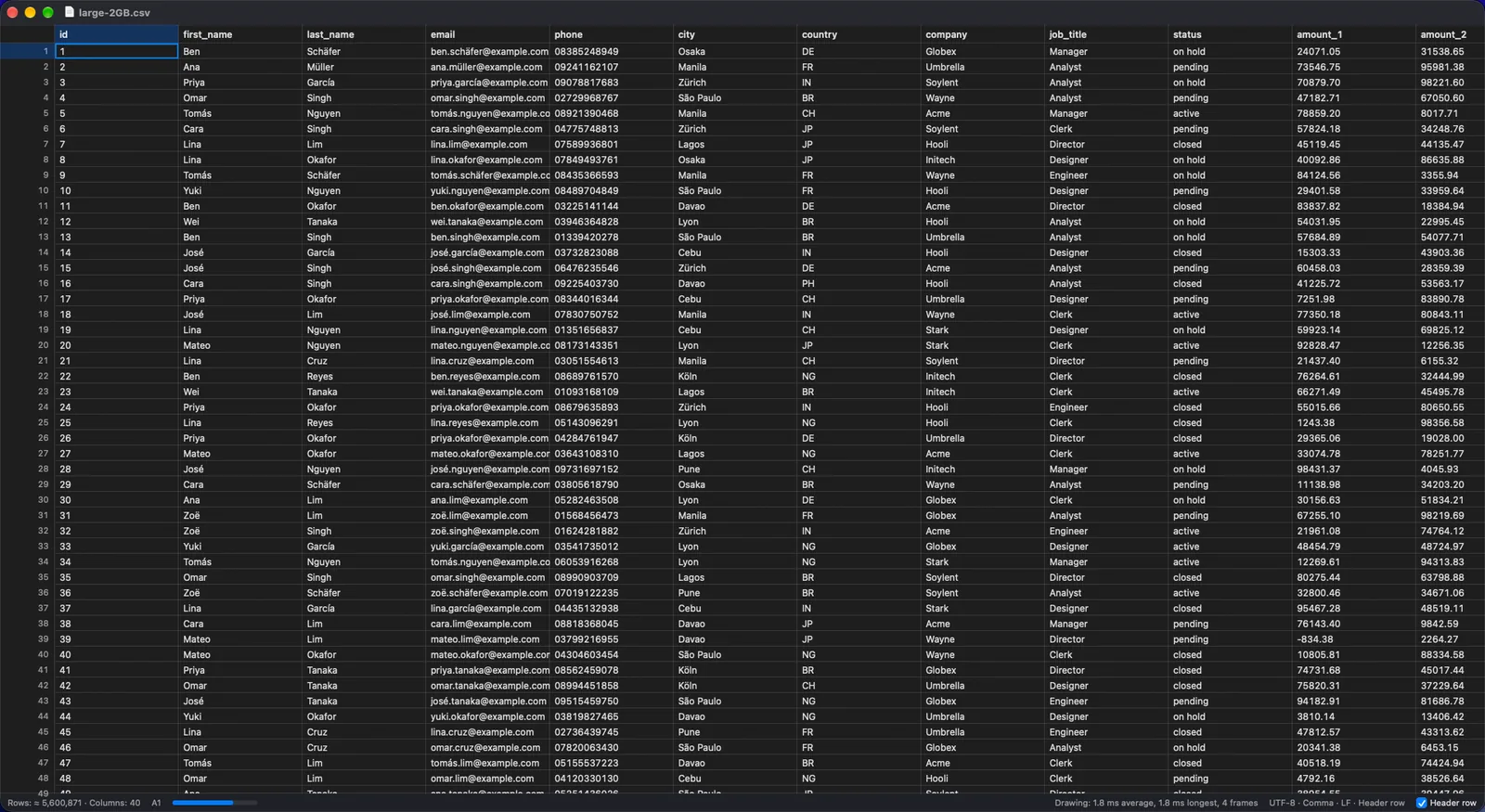
A 2 GB file with 5.6 million rows, open on its first screen. The file is made-up test data.
A CSV editor that respects your file.
StrataCSV is a native Mac editor for CSV and TSV files of any size. It is built around one promise: the file on disk is the truth, and the editor never changes a byte you did not change.
Only your edits change
Rows you did not touch are copied across byte for byte, with their own quoting and line endings. Change one cell and one line of the file is different.
Big files open at once
The first screen of a 2 GB file with 5.6 million rows appears in a few milliseconds, and you can scroll, search and edit while the rest of the file is still being read. In our tests that file needed about 110 MB of memory.
Private
Your files are never uploaded. No account, no analytics, no tracking.
Pay once
One price, no subscription, nothing to renew.
Messy files open the way they were meant to.
Exports from banks, shops and old systems rarely agree on how a CSV looks. StrataCSV works out the format and shows you what it decided.
Reading a file
Detected for you, and yours to change.
The format is detected
Comma, semicolon, tab or pipe separated, with a header row or without, with Windows, Unix or old Mac line endings. The status bar always shows what was found.
Text encodings
UTF-8 (with or without a byte order mark), UTF-16 and Windows-1252 or ISO 8859-1 are recognised, so accents and symbols appear correctly. Any other single-byte encoding can be chosen by hand.
An import sheet when it is not sure
When the detection is doubtful, a sheet shows the first rows and lets you pick the delimiter, encoding and header row before anything is shown. It is remembered for that file.
Awkward files are fine
Fields with line breaks inside quotes, ragged rows, blank lines, a file with no final line ending: all open, and all are saved back the way they were.
Large files
The row index is built in the background, at about 200 MB a second, while you work. Search finds matches and highlights them before the scan has finished.
Edit like a table, save like a text file.
A fast grid for changing cells, rows and columns, with undo for everything.
Working in the table
Everything can be undone.
Edit in place
Type to replace a cell, press Return to edit it, move with the arrow keys, Tab and Page Up and Down. Select cells, rows or columns, and copy and paste them, to and from other apps.
Rows and columns
Insert rows above or below, delete rows, and cut a column out of the file. Each is one step in the Edit menu, with its own undo.
Find and replace
One bar for finding, replacing and showing only the rows that match, in plain text or with regular expressions. Replace shows a preview and a count before it changes anything.
Sort
Sort by a column as text or as numbers, ascending or descending. A badge in the status bar says the table is sorted, and the sort can be undone.
Copy As
Copy the selected cells as a Markdown table or as JSON, with the column names, ready to paste into a document or a message.
Tidy a column, see the result first.
Every cleaning tool shows how many cells or rows it will change, and which, before it does anything. Applying it is one undo step.
The cleaning tools
Preview, apply, undo.
Trim whitespace
Remove spaces at the start and end of the cells in the columns you pick.
Change case
Upper case, lower case or title case for the selected columns.
Clean with a pattern
Replace what matches a regular expression in the selected columns, for phone numbers, codes and other stray characters.
Remove duplicates
Choose the columns that make a row a duplicate, with or without ignoring case. The first row of each kind stays, and the preview tells you how many go.
Fill down
Give each empty cell the value of the nearest filled cell above it.
Split and merge columns
Split a column at a separator into several, or join several columns into one with a separator of your choice.
It tells you what is wrong with a file.
While a file is read, StrataCSV notes where it breaks the usual rules. The Problems panel lists them, takes you to each one, and offers a fix. Nothing changes until you apply one.
What it finds
Each with a jump and a suggested fix.
Too few or too many fields
Rows that do not match the table's width, which you can pad, cut back, or give extra columns.
Quotes that never close
A quote that opens and never ends, which swallows the rest of the file. Close it at the end of its line, or treat it as an ordinary character.
Characters after a closing quote
Found and shown, so you can look at the cell.
Bytes that are not valid text
Replace them, or reopen the file in another encoding.
Blank lines
Blank lines in the middle of a table, which you can remove.
See what is in each column.
The inspector
A panel for the columns and the selected cell.
A profile of every column
The type StrataCSV sees in each column, and how many cells are empty, from a quick look at the first 10,000 rows.
Analyse the whole file
One button runs the full pass for exact counts of empty and different values. Beyond five million rows the count of different values is an estimate, and the panel says so.
The full text of a cell
Long cells and cells with line breaks are shown in full in the panel, below the profile.
Change one cell. One line is different.
Many editors rewrite a whole file when you save. StrataCSV copies every row you did not touch, so a diff of the file before and after shows your edit and nothing else.
- Quoting, line endings and the byte order mark stay as they were
- A mixed-ending file stays mixed
- A file with no final line ending still has none
$ diff orders.csv orders-saved.csv
3c3
< 1003,"Ng, Amy",00417,12.50
---
> 1003,"Ng, Amy",00417,13.50
Built so you do not lose work.
How your files are protected
Backups, recovery and care with the original.
A backup before the first save
The first time you save a file in a session, the original is copied aside. The three most recent copies of each file are kept.
Recovery after a crash
Every change is recorded as you make it. If the app or the Mac stops unexpectedly, StrataCSV offers to bring your unsaved changes back when you open it again.
Saved by swapping, never half-written
The new file is written beside the old one and swapped in when it is complete, so an interrupted save leaves the original as it was. StrataCSV checks there is room on the disk before it starts.
It notices outside changes
If another program changes the file while it is open, StrataCSV tells you and lets you reload or keep your version.
No quiet autosave
Nothing rewrites a multi-gigabyte file in the background. A file changes when you save it.
At home on macOS.
Built in, not bolted on
Native, quick and accessible.
A command bar
Press Command-K and type the name of any command in the menus. Every command can be found without knowing where it lives.
VoiceOver
The grid is a table to VoiceOver. It reads each cell with its column name and row, and says so as you move.
Quick Look
Select a CSV in the Finder and press Space for a table of its first rows, even for a very large file.
Shortcuts
A Clean CSV File action for the Shortcuts app: trim, remove duplicates, and change delimiter, encoding or line endings without opening a window.
Tabs, full screen and dark mode
All as you expect from a Mac app, with the system's own colours.
Open, check, save.
Three steps, and your file changes only where you changed it.
- 1. OpenDrop a file on the app. The first screen appears at once, and the format it found is shown in the status bar.
- 2. Check and cleanLook at the Problems panel, then fix and tidy with previews, one undo step at a time.
- 3. SaveRows you did not touch are copied as they were. The old file is backed up the first time.
$29.99. Pay once. Yours to keep.
Try StrataCSV free for 14 days with every feature on. If it earns a place in your work, one payment unlocks it for good.
- 1. TryDownload StrataCSV and use it for 14 days. No card, no account.
- 2. UnlockPay once and open the licence file we email you.
- 3. KeepNo renewals. Your files stay yours either way.
The price is shown at checkout.
Good to know.
Is it a spreadsheet?
No. StrataCSV edits the text of CSV and TSV files as a table. It has no formulas, charts or Excel files. It is for the files you would otherwise open in a text editor or wait for a spreadsheet to load.
How big a file can it open?
It is designed for files of 20 million rows. We test with a 2 GB file of 5.6 million rows and 40 columns: the first screen appears in milliseconds, the whole file is indexed in about nine seconds, and saving after an edit takes under a second.
Will opening a file change it?
No. Opening never changes the file, and nothing is written until you save.
Which text encodings does it support?
UTF-8, UTF-16, Windows-1252 and ISO 8859-1 are detected, and other single-byte encodings can be chosen. Legacy multi-byte encodings such as Shift-JIS are not supported in version 1.
Does it send my files anywhere?
No. Your files are never uploaded, and there is no account and no analytics. About once a week, StrataCSV fetches a small public list of withdrawn licences; nothing about you or your files is sent.
What happens if it crashes?
Your changes are recorded as you make them, and StrataCSV offers to restore them when you open it again.
Which Macs does it run on?
Macs with Apple silicon, running macOS 26 or later. There is no Intel version.
Can I try it first?
Yes. The version from this website has a 14-day free trial. When the trial ends you can still open and read your files; editing and saving need a licence.
Where can I get it?
StrataCSV is available now. Use the buttons at the top of this page.